
How to Endorse a Check for Mobile Deposit Correctly: 7 Easy Steps
 A Few Words on the Back of Your Check Can Make a Difference
Learning how to endorse a check for mobile deposit takes only a few minutes, but it can help you avoid unnecessary delays. Unlike a traditional check deposit, depositing through your phone may require more than just your signature.
Perhaps you’ve received a tax refund, a birthday check or a payment from a customer. Before reaching for a pen, check your bank or credit union’s instructions. The required endorsement wording can vary by institution.
If you’re unfamiliar with banking apps, our guide to digital and online banking explains the essentials.
What You’ll Learn
- Where to sign and what to write.
- Seven steps for endorsing checks correctly.
- When a restrictive endorsement is required.
- How to handle joint and business checks.
- What to do if you make an endorsement mistake.
Quick Answer: How to Endorse a Check for Mobile Deposit
Sign your name in the designated endorsement area on the back of the check. If your bank or credit union requires a restrictive endorsement, add its exact wording beneath your signature or as directed.
This example is illustrative. Use your actual signature and follow your institution’s required wording.
6 Key Takeaways
- Check your banking app’s endorsement instructions first.
- Keep your signature within the designated area.
- Use blue or black ink, as directed.
- Confirm signature requirements for joint checks.
- Wait until you’re ready to deposit before endorsing.
- Retain the original check for the required period.
Bottom Line: Follow your own bank’s endorsement instructions rather than assuming the same wording works everywhere.
Mobile Check Endorsement at a Glance
A check endorsement authorizes the handling of a check. For mobile deposits, additional wording may restrict the check to a particular deposit method or financial institution.
Mobile Deposit Endorsement Requirements
Scroll horizontally on smaller screens if needed.
| Requirement | What You Should Know |
|---|---|
| Signature | Follow the applicable payee signature requirements. |
| Restrictive Wording | Use the exact wording specified by your institution. |
| Bank Name | Include your bank or credit union’s name if required. |
| Mobile Deposit Checkbox | Check the box if instructed. Additional wording may still be necessary. |
| Check Eligibility | Confirm that your check type and account qualify for mobile deposit. |
For a closer look at depositing checks and managing money from your phone, explore these essential mobile banking app features.
Understanding Check Endorsements: A Beginner’s Guide
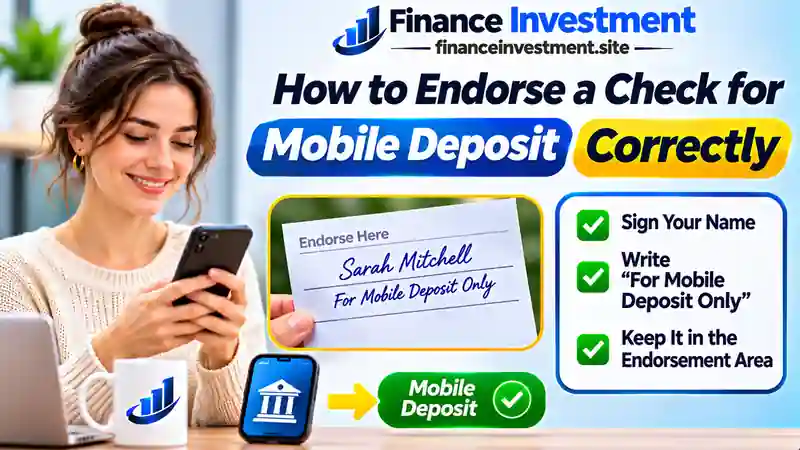
The person or business named on a check is called the payee. An endorsement generally involves the payee signing the back of the check to authorize its transfer or collection. Additional instructions can limit how the check may be used.
Blank vs. Restrictive Endorsements
Blank Endorsement
You sign your name without adding instructions. A check endorsed this way may be easier for someone else to misuse if it is lost or stolen.
Restrictive Endorsement
You sign the check and add instructions limiting its use. Wording such as For Mobile Deposit Only can help restrict the deposit method, although it does not eliminate fraud risks.
Where Is the Endorsement Area on a Check?
Look for the signature lines or “Endorse Here” instructions near one end of the back of your check. Keep your writing inside the designated area and above any marked boundary reserved for financial institution processing.
Using a credit union instead of a bank? Our guide to how credit union mobile banking works explains the services available through these institutions.
Good to Know: Even a correctly endorsed check must meet your financial institution’s mobile deposit eligibility rules.
7 Easy Steps to Endorse a Check for Mobile Deposit Correctly
Have your paper check, a pen and your banking app ready. Here’s how to prepare your check without overlooking the small details that matter.
Step 1: Read Your Bank’s Mobile Deposit Instructions
Sign in to your official banking app. Check the endorsement instructions, eligible check types and available deposit limits before writing on the check.
Step 2: Check the Payee Name
Make sure the check is payable to an eligible recipient for the destination account. Ask your institution for guidance if a name is misspelled or multiple payees are listed.
Step 3: Find the Endorsement Area
Turn the check over and locate the designated endorsement space. Leave enough room for your signature and any additional instructions without writing in the bank processing area.
Step 4: Sign the Back of the Check
Sign using the ink color and signature format your institution requires. For checks payable to multiple people, obtain all required signatures before proceeding.
Step 5: Add the Required Restrictive Endorsement
Write the required mobile deposit wording or use an approved preprinted checkbox, depending on your institution’s instructions.
Bank-Specific Mobile Deposit Endorsement Examples
Sign using dark blue or black ink. Wells Fargo also accepts its specified preprinted mobile deposit checkbox instead of handwritten restrictive wording when available. See the official mobile deposit instructions.
Navy Federal requires every listed payee to sign. Members should follow its official mobile check deposit requirements.
These examples apply to the named institutions. Your own bank or credit union may require different wording.
Step 6: Review and Photograph Your Check
Make sure the endorsement is readable. Capture both sides through the banking app, using good lighting and keeping all four corners visible.
Step 7: Submit the Deposit and Keep Your Check
Review the amount and destination account. Submit the deposit, save the confirmation and monitor its status. Follow your institution’s instructions for marking, storing and eventually destroying the original check.
If you haven’t activated your banking app, our guide on how to set up mobile banking can help you get started.
Important: Wrote the wrong bank name or didn’t receive a deposit confirmation? Contact your institution before altering the endorsement or attempting another deposit.
Benefits and Drawbacks of Restrictive Check Endorsements
A restrictive endorsement provides an extra safeguard when depositing checks by phone. The trade-off is less flexibility if you later need to use another deposit method.
Benefits
- Helps discourage unauthorized check use.
- Clearly identifies the intended deposit method.
- Can help reduce duplicate deposit risks.
- Satisfies applicable mobile endorsement requirements.
- May prevent avoidable endorsement-related delays.
Drawbacks
- May restrict branch or ATM deposit options.
- Incorrect wording can cause rejection.
- Switching banks may require additional assistance.
- Does not establish check authenticity.
- Cannot guarantee deposit approval.
These trade-offs are worth considering alongside the broader benefits and limitations of digital banking.
Check Endorsement Types Compared: Which One Should You Use?
Blank, restrictive and special endorsements serve different purposes. Mobile-specific and bank-specific instructions are variations of restrictive endorsements designed for particular deposit requirements.
Scroll horizontally on smaller screens to view all three columns.
| Endorsement Method | What You Write or Do | Mobile Deposit Suitability |
|---|---|---|
| Blank Endorsement | Payee signature only. | May not meet mobile deposit requirements. |
| General Restrictive | Signature plus “For Deposit Only.” | Additional wording may be required. |
| Mobile-Specific Restrictive | Signature plus “For Mobile Deposit Only.” | Suitable if your institution accepts this wording. |
| Bank-Specific Restrictive | Signature and required wording naming the institution. | Use when your institution requires its name. |
| Preprinted Mobile Deposit Checkbox | Sign and mark the designated checkbox as instructed. | Accepted only under applicable institution rules. |
| Special Endorsement | “Pay to the order of [Recipient Name]” and the original payee’s signature. | Many institutions exclude third-party checks from mobile deposits. |
Practical Tip: If you are unsure which endorsement to use, check your banking app before signing. Never assume a third-party check or preprinted checkbox will automatically qualify for mobile deposit.
Mobile Check Endorsement: Costs, Risks and Expert Tips
Are There Any Mobile Check Deposit Fees?
Signing a check does not itself incur a fee. Many banks and credit unions offer standard mobile deposits at no additional charge. However, optional expedited funds availability services may cost extra. Check your account’s fee schedule for applicable charges and conditions.
Risks of an Incorrect Endorsement
An incomplete signature or incorrect restrictive wording can interrupt deposit processing. If you make an endorsement mistake, contact your financial institution before erasing, crossing out or replacing any instructions.
For further guidance on different endorsement methods, read Chase’s official check endorsement guide.
Protect Yourself From Duplicate Deposits
Do not redeposit a pending or accepted check. If a submission fails, confirm that the original deposit was unsuccessful and obtain your institution’s approval before trying again.
Warning: A Correct Endorsement Cannot Prevent Fake Check Fraud
Money appearing in your available balance does not prove a check is genuine or has been paid. Never send money back to someone who overpays you by check. Contact your bank immediately if you suspect fraud.
Expert Tip: Store Your Deposited Check Safely
Keep the original check in a secure place for your institution’s specified retention period. Follow its instructions for marking and securely destroying deposited checks. Save your confirmation separately for future reference.
5 Common Mobile Check Endorsement Mistakes to Avoid
Small endorsement errors can turn a simple mobile deposit into an unnecessary banking problem. Here are five mistakes worth avoiding.
- Signing too early: Endorse the check only when you are ready to deposit it.
- Using incomplete wording: Include every endorsement detail your institution requires.
- Missing a required signature: Confirm the endorsement rules for checks payable to multiple people.
- Writing outside the designated area: Leave the bank processing space clear.
- Confusing submission with acceptance: Review your deposit status and funds availability separately.
Practical Example: Depositing a $450 Reimbursement Check
Hypothetical example for illustration
Sarah receives a $450 reimbursement check from her employer. She initially plans to sign her name and deposit it through her credit union’s mobile app.
After reviewing the instructions, she discovers that the endorsement must also include her credit union’s name. She adds the required wording before photographing and submitting the check.
Sarah saves her confirmation and monitors the deposit status instead of assuming the money is immediately available.
Financial Lesson
Taking a moment to check endorsement instructions can help prevent avoidable delays. Plan your spending around confirmed funds availability, not simply the amount you submitted for deposit.
Who Can Benefit From Proper Mobile Check Endorsements?
Mobile check deposits are convenient for different account holders, but endorsement requirements depend on the check, account type and financial institution.
Individual Account Holders
Deposit eligible checks payable to you using your signature and any required restrictive wording.
Joint Account Holders
Check whether the payees are joined by “and” or “or,” and confirm signature and receiving account requirements.
Small Business Owners
Use authorized business endorsements and an eligible business account for checks payable to your company.
Seniors and Banking Beginners
Follow endorsement instructions in your official banking app and contact your institution if you need assistance.
Eligibility Reminder: A correct endorsement does not guarantee acceptance. Confirm account eligibility, permitted check types and deposit limits before submitting.
Frequently Asked Questions About Mobile Check Endorsements
Final Verdict: Endorse Your Check Correctly Before Depositing
Learning how to endorse a check for mobile deposit is a simple but valuable banking skill. Following your bank or credit union’s exact instructions can help prevent avoidable rejection and processing delays.
Our Recommendation: Verify the payee details, sign in the designated area and follow all required endorsement instructions. Confirm successful deposit processing and retain the original check for the required period before securely destroying it as directed.
For more practical ways to manage your money safely and confidently, explore our complete digital and online banking guide.
Related Resources: Explore More Mobile Banking Guides
Continue building your banking knowledge with these practical guides and official resources covering mobile deposits, check endorsements and digital banking services.
Continue Learning With FinanceInvestment
- Digital and Online Banking: Complete Beginner Guide
- How to Set Up Mobile Banking for the First Time
- 12 Essential Mobile Banking App Features
- How Credit Union Mobile Banking Works
- Digital Credit Unions Explained: Benefits and Fees
- Mobile Banking vs. Online Banking: Key Differences
- Digital Banking Pros and Cons
Official Bank and Credit Union Resources
- Wells Fargo: Mobile Check Deposit Instructions
- Navy Federal Credit Union: Mobile Check Deposits
- Chase: How to Endorse a Check
These resources provide useful guidance, but endorsement and deposit requirements may vary by institution. Follow your own bank or credit union’s instructions.
Financial Disclaimer: This article is for educational purposes only and does not constitute personalized financial or legal advice. Verify current check endorsement, eligibility and deposit requirements with your bank or credit union.